Table Of Content
Table Of Content
One of the most common misconceptions we need to address first is this: an interface does not equal a standard. In the past, things were relatively easy to understand—we could clearly distinguish between USB 2.0 and USB 3.0. However, the introduction of USB Type-C completely disrupted that clarity. When DisplayPort Alt Mode and Thunderbolt handshake protocols were added into the mix, the situation became even more confusing.
Because both Thunderbolt 3 and DisplayPort 2.0 are delivered through the USB Type-C connector, many people have come to associate USB Type-C with “high speed” by default. On top of that, aggressive marketing has played a major role. Some smartphone and PC manufacturers use USB Type-A on one end and USB Type-C on the other, subtly—or sometimes explicitly—implying that simply using a Type-C connector guarantees faster data transfer and charging speeds. They further suggest that their products gain performance “buffs” merely by adopting USB Type-C.
Many consumers are unaware of these marketing tactics. Even worse, some motherboard manufacturers include a Type-C port that only supports USB 3.1 Gen 1, yet market it as something more advanced. The truth is simple: USB Type-C is just a connector shape. It can carry many different protocols. In fact, if one really wanted to, a Type-C port could even be wired for USB 1.0, which has a transfer speed of just 192 KB/s.
To borrow a well-known advertising slogan: not all milk is premium milk. Likewise, not all Type-C ports support high-speed data transfer or audio and video output. This is why it is important to understand that having a USB Type-C port does not necessarily mean you are getting Thunderbolt or USB4-level performance. The introduction of USB4 represents a preparatory step toward unifying interfaces across future mobile devices. With that context, let’s take some time to systematically review USB interfaces.
The Past and Present of USB 2.0
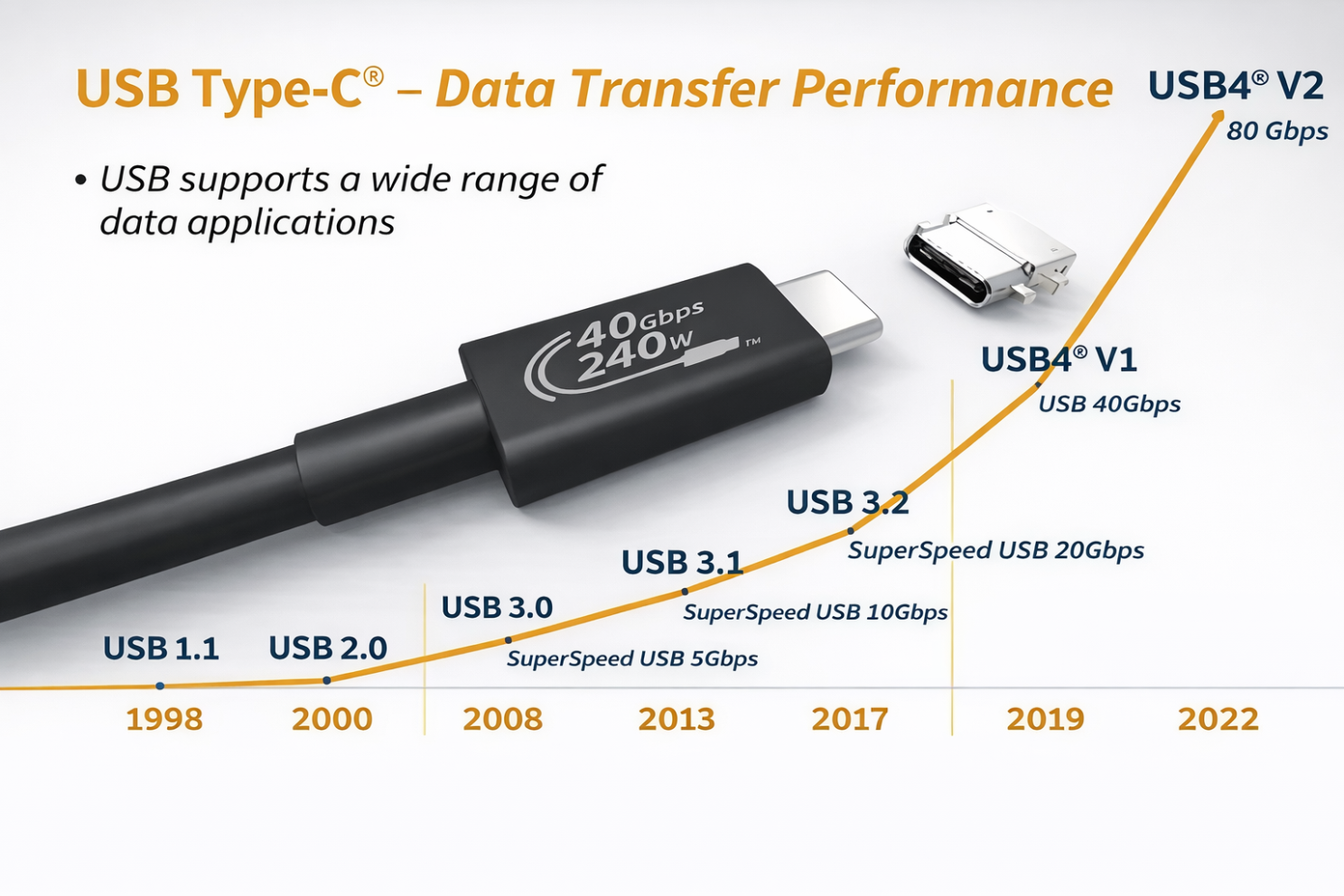
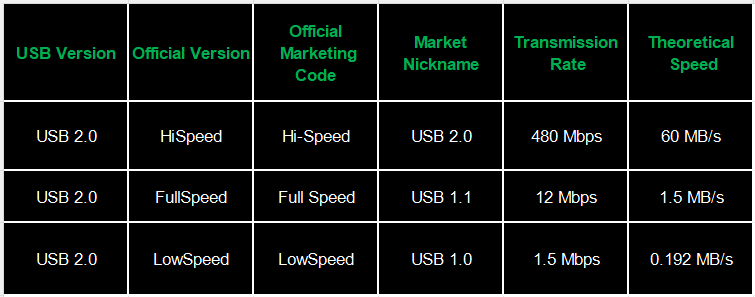
Back in the USB 2.0 era, the USB Implementers Forum (USB-IF) rebranded the earlier standards. USB 1.0 was renamed USB 2.0 Low Speed, USB 1.1 became USB 2.0 Full Speed, and what we traditionally considered “true” USB 2.0 was renamed USB 2.0 High Speed.
Effectively, USB 1.0 and USB 1.1 were “upgraded in place” to USB 2.0 through naming alone, without any actual performance changes—an early example of the confusing naming conventions that would later become a recurring issue.
The Evolution of USB 3.0, 3.1, and 3.2
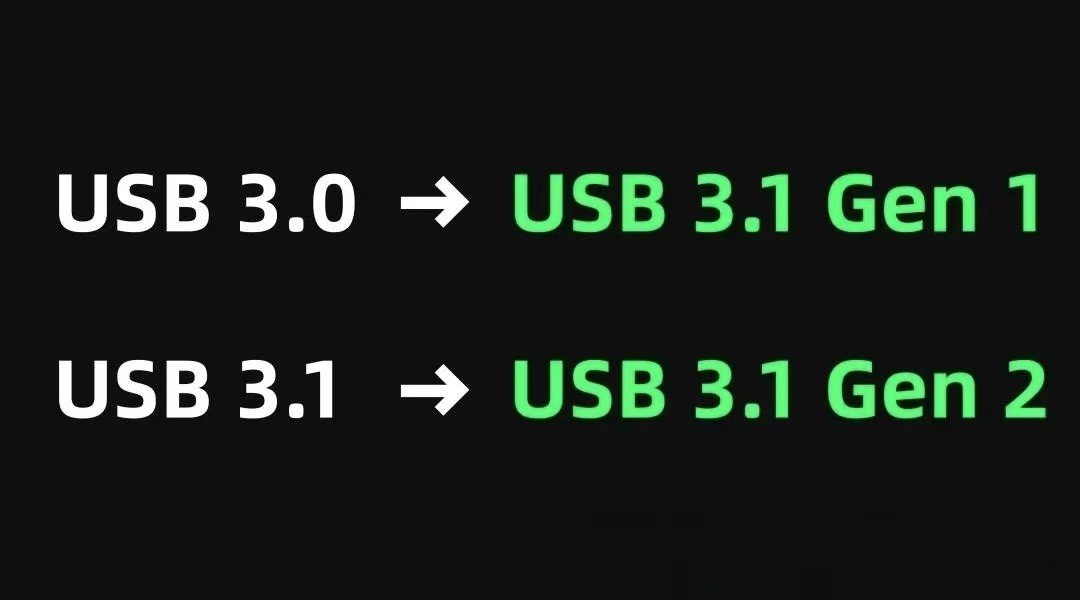
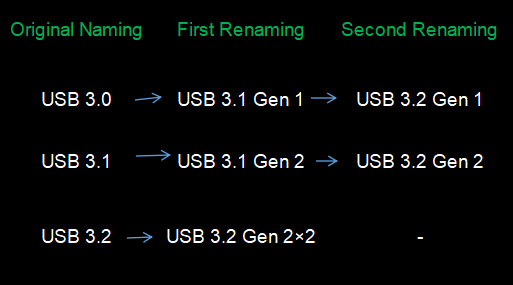
When USB 3.1 was introduced, USB-IF once again revised the naming scheme. USB 3.0 was renamed USB 3.1 Gen 1, while the original USB 3.1 became USB 3.1 Gen 2.
Later, with the release of USB 3.2, the organization repeated the same approach. USB 3.1 Gen 1 was renamed USB 3.2 Gen 1, USB 3.1 Gen 2 became USB 3.2 Gen 2, and the new dual-lane version was labeled USB 3.2 Gen 2×2. As the suffixes grew longer, the naming system became increasingly complex and difficult for consumers to understand.
The History of USB4
When USB4 was first announced, USB-IF likely realized that endlessly adding suffixes was not a sustainable solution. They initially stated that future versions would no longer follow the same naming pattern. However, when the next revision arrived, it was instead differentiated by v1 and v2, which only partially improved clarity.
As criticism mounted online, USB-IF eventually abandoned these convoluted naming conventions altogether and adopted a far more straightforward approach: naming interfaces based on their actual data transfer speed. For example, an interface capable of 10 Gbps is labeled USB 10Gbps, while one that supports 80 Gbps is called USB 80Gbps.
According to the USB-C Cable Power Rating Logo Usage Guidelines released by USB-IF, all USB-C cables are now required to display logos indicating both their supported data transfer speed and power delivery capability. This allows consumers to quickly identify a cable’s performance at a glance.
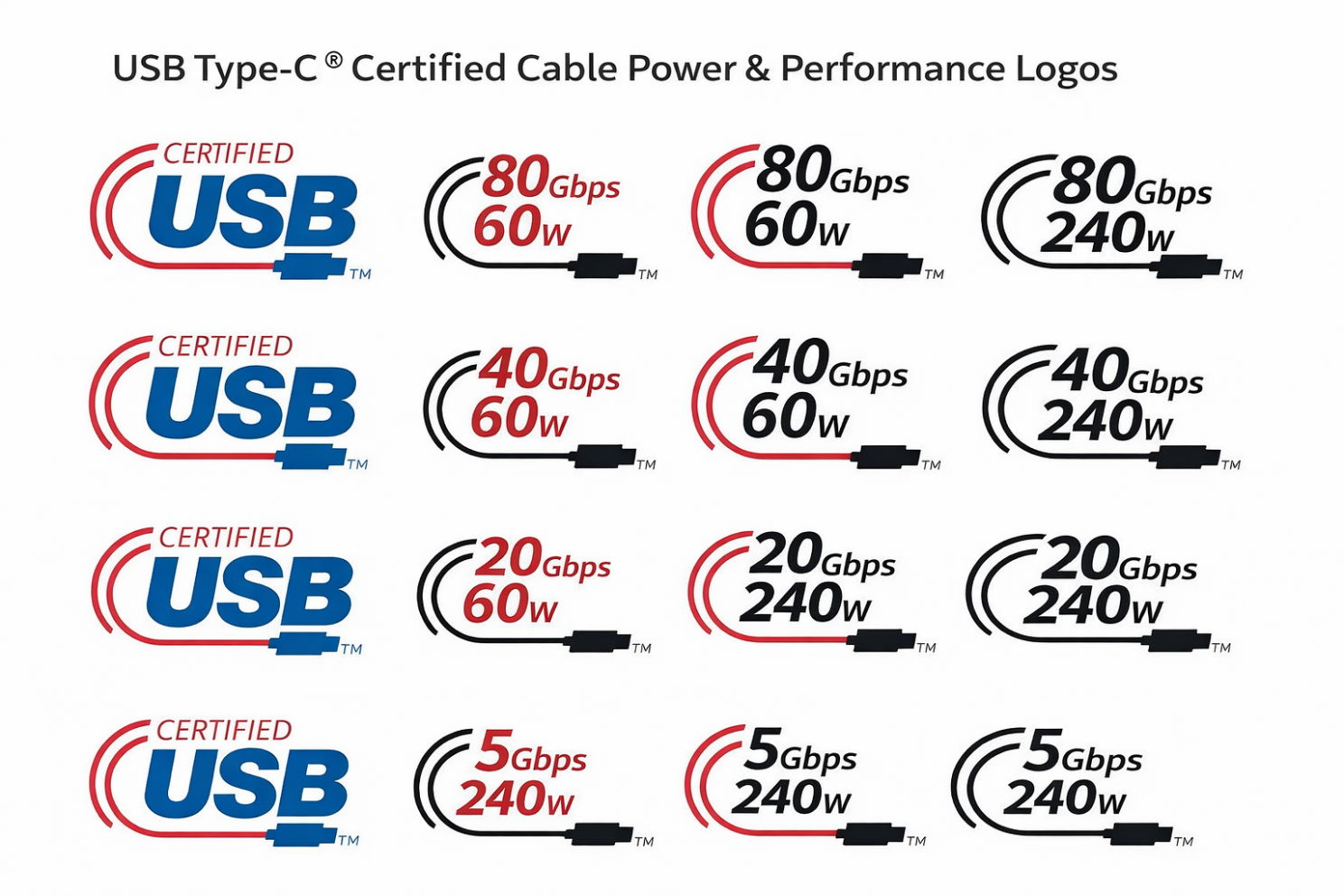
In hindsight, had USB-IF adopted this simple and transparent system from the beginning—and had manufacturers followed suit—the industry likely would have avoided today’s widespread confusion, where even buying a single cable requires prior research.
Thunderbolt Adds Another Layer of Complexity
For a USB-C (Type-C) port, the supported specifications may include USB 5Gbps, 10Gbps, 20Gbps, 40Gbps, or even 80Gbps. Alternatively, the same physical port may support Thunderbolt 3, Thunderbolt 4, or Thunderbolt 5. Despite sharing the same connector shape, these interfaces can differ dramatically in terms of functionality.
To help users quickly understand these differences, it is useful to compare specifications such as data transfer speed, power delivery, video output capabilities, and support for external devices.
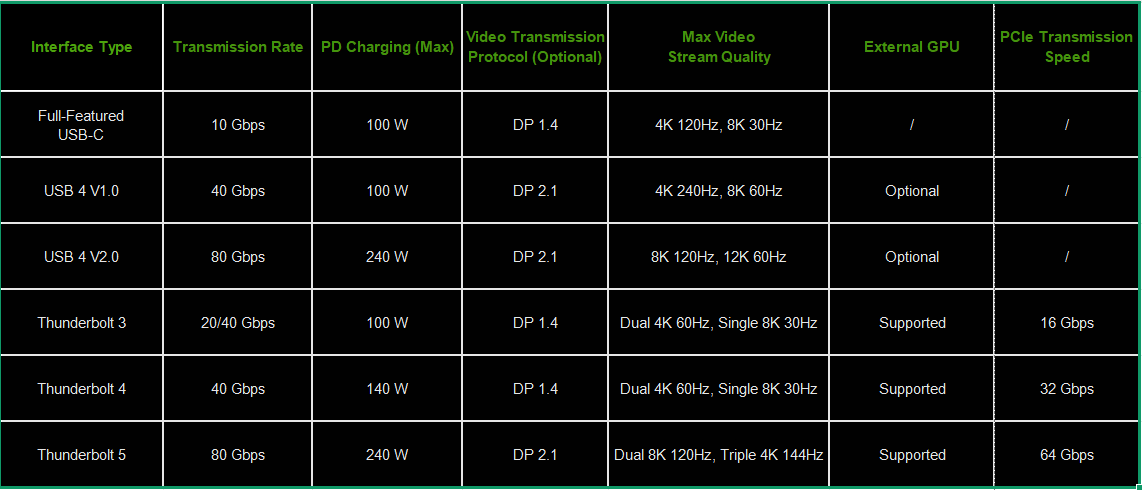
Ideally, every port and every cable would support the highest available standard. In reality, however, manufacturers must balance cost, product positioning, and real-world usage scenarios, leading them to equip different devices with different interface specifications.
That said, it is clear that over the past few years—whether through USB-IF’s continued efforts to refine naming conventions or through broader industry trends—the direction has consistently been toward greater unification and convenience.
In the long run, a complete unification of physical connectors and interface specifications is not impossible.
However, experience has shown that relying solely on manufacturers’ self-motivation is insufficient. Otherwise, Apple would not have delayed adopting USB-C on the iPhone until just two years ago. Even today, many smartphones still use USB-C ports limited to USB 2.0 speeds, where wired data transfer can be slower than using wireless alternatives.
Discover more: www.starfirecableshubs.com