

Table Of Content
Table Of Content
Your HDMI display works during testing but suddenly flickers after installation. Unexpected black screens and signal loss can delay projects and increase troubleshooting costs.
HDMI EMI problems occur when electromagnetic interference affects signal transmission. Common symptoms include screen flickering, black screens, and intermittent signal loss. Possible solutions include improving cable shielding, separating HDMI cables from electrical equipment, checking signal integrity, and using suitable HDMI Active Optical Cables (AOC) for long-distance installations.
In professional AV installations, I believe HDMI signal reliability deserves more attention than cable specifications alone.
Many buyers focus on resolution, bandwidth, and cable length. These factors matter, but they do not tell the whole story.
A cable may work perfectly in a small test room but perform differently in a conference room, control center, or industrial environment.
The difference may come from electromagnetic interference, signal loss, connector quality, or the installation environment.
At STAR FIRE TECH, we have worked with connectivity solutions since 2006. Our experience in HDMI copper cables and Hybrid HDMI Active Optical Cables has shown us why cable construction and signal testing matter.
For AV integrators, cable distributors, and system designers, understanding HDMI EMI problems can help reduce installation risks and improve long-term system reliability.
What Are the Common Symptoms of HDMI EMI Interference?
An HDMI display suddenly flickers or turns black during operation. The problem may disappear and return without warning, making it difficult to identify the real cause.
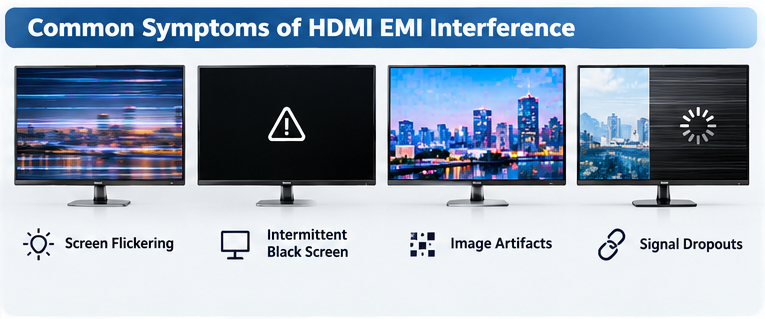
Common symptoms of HDMI EMI interference include screen flickering, intermittent black screens, video signal dropouts, and image artifacts. These symptoms may become more noticeable near motors, power supplies, or other electrical equipment. However, similar problems can also result from damaged cables, bandwidth limitations, or HDMI compatibility issues.
Why Does HDMI Screen Flickering Happen?
I often use screen flickering as an example when explaining HDMI signal problems.
Imagine a conference room where a laptop connects to a large display.
The picture looks normal during the first test. Later, the display begins flickering when other equipment is operating.
One possible explanation is electromagnetic interference affecting the HDMI signal path.
HDMI uses high-speed digital transmission. The receiver must correctly identify the data sent from the source device.
When electrical noise reduces signal quality, transmission errors may occur.
However, I would not assume that every flickering screen is caused by EMI.
A loose connector, poor cable construction, or incompatible display setting can create similar symptoms.
How Can You Identify Different HDMI Signal Problems?
Symptom
Possible Cause
Recommended Check
Screen flickering
EMI or unstable signal
Check cable routing and connections
Intermittent black screen
Signal loss or handshake issue
Test another HDMI cable
Video signal dropout
Weak signal or interference
Check cable length and bandwidth
Image artifacts
Transmission errors
Test signal integrity
Unstable 4K or 8K display
Bandwidth or compatibility issue
Check source and display settings
Why Should AV Integrators Identify the Symptoms Early?
I believe early troubleshooting can save time and reduce unnecessary costs.
When an HDMI installation fails, replacing the cable may seem like the easiest solution.
However, the problem may come from the source device, display, installation environment, or another component in the signal path.
For professional AV projects, I recommend checking the complete connection before deciding which product needs replacement.
This approach can help installers avoid repeated troubleshooting and unnecessary equipment changes.
What Causes Electromagnetic Interference in HDMI Cables?
An HDMI cable may work reliably in an office but become unstable near industrial equipment. Electrical noise can affect the quality of signal transmission.
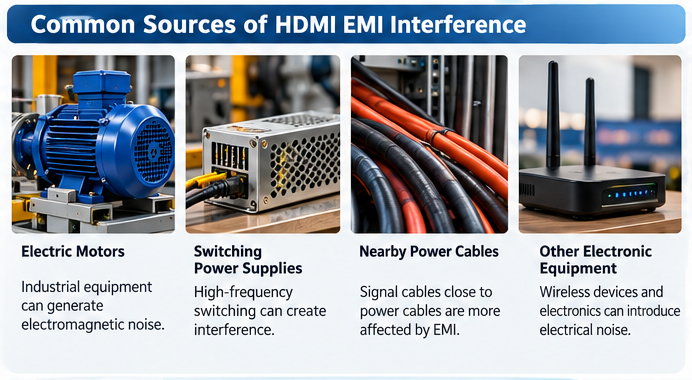
HDMI electromagnetic interference can come from electric motors, switching power supplies, nearby power cables, and other electronic equipment. Poor shielding, weak connector construction, and improper cable routing can increase interference risks. Longer copper cables may also have less signal margin, making high-bandwidth HDMI transmission more sensitive to electrical noise.
How Does EMI Affect HDMI Signal Transmission?
I find it useful to explain EMI as unwanted electromagnetic energy that can disturb an electronic system.
HDMI cables transmit high-speed digital signals between source devices and displays.
These signals depend on several electrical characteristics, including impedance, attenuation, and signal integrity.
When unwanted electromagnetic energy couples into the signal path, it can reduce the receiver’s ability to recover the transmitted data.
The result may be unstable video or temporary signal loss.
However, the actual effect depends on the cable design, interference source, and connected equipment.
Which Environments Have Higher EMI Risks?
Installation Environment
Potential Interference Source
Possible Impact
Conference rooms
Power supplies and electrical wiring
Unstable HDMI connections
Industrial facilities
Motors and frequency converters
Signal interference
Control rooms
Multiple electronic devices
Increased electrical noise
Digital signage systems
Power distribution equipment
Intermittent display problems
Equipment cabinets
Dense cable routing
Greater coupling between cables
Why Do Cable Shielding and Connector Design Matter?
I believe the internal construction of an HDMI cable is just as important as its external appearance.
Two HDMI cables may look almost identical but perform differently.
Their shielding materials, conductor structures, connector housings, and manufacturing quality may not be the same.
A properly designed shield can reduce unwanted electromagnetic coupling.
However, shielding performance also depends on how the cable shield connects to the connector and equipment.
Poor termination can reduce the effectiveness of the shielding system.
At STAR FIRE TECH, we pay attention to cable construction, material selection, and quality inspection.
I believe these details are especially important for customers who need reliable HDMI connections in professional AV environments.
Can a Poorly Shielded HDMI Cable Cause Screen Flickering?
A cable may support the required resolution but still produce unstable video. Poor shielding can increase interference risks, especially in electrically noisy installations.
Yes, a poorly shielded HDMI cable can contribute to screen flickering when electromagnetic interference affects signal transmission. Shielding helps reduce unwanted electrical noise, but it cannot solve every HDMI problem. Cable bandwidth, connector quality, signal attenuation, and device compatibility must also be considered.
How Does HDMI Cable Shielding Work?
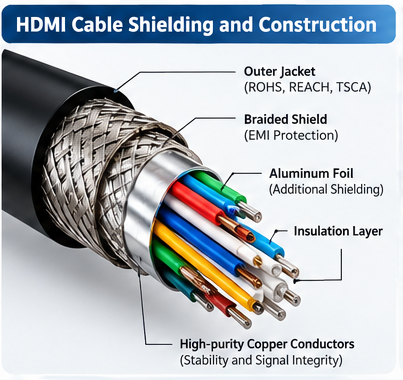
I usually explain cable shielding as a protective structure designed to reduce electromagnetic coupling.
HDMI cables may use metal foil, braided shielding, or a combination of shielding materials.
These structures help reduce the amount of unwanted electromagnetic energy that reaches sensitive signal conductors.
The effectiveness of shielding depends on several factors.
These include material selection, shield coverage, connector termination, and the frequency of the interference.
I also pay attention to the complete cable assembly.
Even when the cable body has good shielding, poorly designed connectors can reduce overall protection.
What Should Buyers Check When Evaluating HDMI Shielding?
Evaluation Factor
Why It Matters
Shielding structure
Helps reduce electromagnetic coupling
Connector housing
Supports the shielding design
Shield termination
Maintains shielding continuity
Impedance control
Supports signal integrity
Cable construction
Affects transmission consistency
Quality testing
Helps verify product performance
Why Is Signal Integrity Testing Important?
I believe cable quality should be supported by testing rather than marketing claims alone.
At STAR FIRE TECH, our quality control process includes incoming material inspection, production inspection, and outgoing quality inspection.
We also use Time Domain Reflectometry (TDR) equipment to evaluate electrical characteristics such as impedance behavior.
TDR testing can help identify impedance discontinuities that may affect high-speed signal transmission.
However, TDR does not directly measure EMI shielding effectiveness.
For a complete EMI evaluation, suitable electromagnetic compatibility testing methods are needed.
I believe professional buyers should ask suppliers about both signal performance and shielding design when selecting HDMI cables for demanding installations.
Why Do Longer HDMI Cables Have More Signal Problems?
A short HDMI cable works perfectly, but a longer cable starts losing its picture. This can create unexpected problems in large AV installations.
Longer copper HDMI cables generally experience greater signal attenuation. As transmission distance increases, the receiver may have less signal margin, especially at high bandwidths. Electromagnetic interference can further reduce reliability. High-quality copper cables, active HDMI cables, and Hybrid HDMI AOCs can help address different transmission requirements.
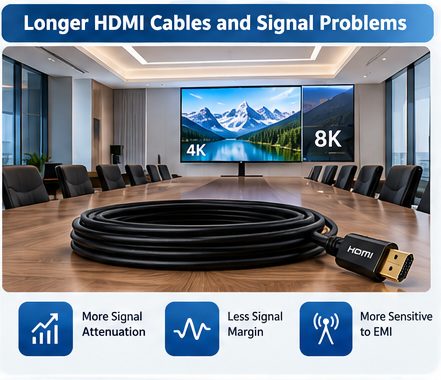
How Does Cable Length Affect HDMI Performance?
I often explain that HDMI transmission becomes more challenging as copper cable length increases.
High-speed electrical signals experience attenuation as they travel through copper conductors.
The amount of loss depends on cable length, conductor design, materials, and signal frequency.
At higher resolutions and refresh rates, maintaining signal integrity becomes more demanding.
This does not mean that every long copper HDMI cable will fail.
A well-designed cable can perform reliably within its intended operating range.
However, I believe buyers should consider the required bandwidth and installation distance together.
What Are the Differences Between Copper HDMI and HDMI AOC?
Feature
Copper HDMI Cable
Hybrid HDMI AOC
Transmission medium
Electrical conductors
Optical fibers and electrical conductors
Long-distance signal loss
Increases with cable length
Lower loss along the optical data path
EMI susceptibility
Depends on shielding and design
Optical data path resists EMI
Connector electronics
Passive or active depending on design
Active electronics required
Typical application
Short and selected medium distances
Long-distance AV installations
When Should Buyers Consider Hybrid HDMI AOC?
For long-distance professional AV projects, I often recommend evaluating Hybrid HDMI Active Optical Cables.
These cables convert high-speed electrical data into optical signals for transmission through fiber.
The optical transmission path is not affected by electromagnetic interference in the same way as copper high-speed conductors.
This can be useful in conference rooms, control centers, classrooms, and digital signage systems.
However, I also explain that Hybrid HDMI AOCs are not completely immune to EMI.
Their connector electronics and remaining electrical conductors still require careful design.
For this reason, I believe product construction, compatibility, and testing remain important even when optical transmission is used.
How Can You Fix HDMI EMI Interference Problems?
Repeated HDMI signal failures can waste installation time and increase maintenance costs. I recommend checking the complete system before replacing cables or equipment.
To fix HDMI EMI problems, inspect cable connections, test a known-good HDMI cable, separate signal cables from power wiring, and check nearby electrical equipment. If the problem continues, evaluate cable shielding, signal bandwidth, and device compatibility. For long-distance installations, consider a suitable Hybrid HDMI AOC solution.
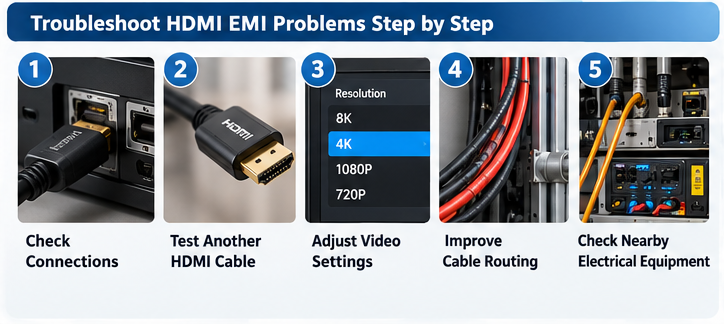
What Should You Check First?
I recommend starting with simple troubleshooting steps.
Step 1: Check the HDMI connectors. I inspect both ends of the cable to confirm that the connectors are properly inserted.
Step 2: Test another HDMI cable. I use a known-good cable that supports the required resolution and refresh rate.
Step 3: Check the video settings. I temporarily reduce the resolution or refresh rate to see whether the connection becomes stable.
Step 4: Review the installation environment. I check whether the HDMI cable runs close to power cables, motors, or other electrical equipment.
Step 5: Consider an alternative transmission solution. If a long copper connection remains unstable, I evaluate whether an active cable or HDMI AOC would be more suitable.
How Can Better Cable Routing Reduce EMI?
I believe proper cable routing is one of the simplest ways to reduce interference risks.
When possible, I recommend keeping HDMI signal cables away from high-power electrical wiring.
I also avoid unnecessary cable bundling and excessive bending.
For professional installations, I recommend following the applicable electrical and cabling standards.
Any work involving electrical equipment or protective grounding should be performed by qualified personnel.
How Can You Determine Whether EMI Is the Real Cause?
Troubleshooting Result
Possible Explanation
Signal improves after moving the cable
Possible electromagnetic interference
Signal improves with a shorter cable
Possible signal attenuation
Signal improves at lower resolution
Possible bandwidth limitation
Problem disappears with another cable
Cable quality or damage
Problem occurs with only one device
Compatibility or device issue
How Can Hybrid HDMI AOC Reduce EMI Risks in Professional AV Systems?
Large AV installations need reliable video over long distances. Traditional copper transmission may become difficult when bandwidth demands and electrical interference increase.
Hybrid HDMI AOCs use optical fibers to transmit high-speed video data, reducing electrical signal loss and susceptibility to EMI along the optical path. They are useful for long-distance conference room, control room, and digital signage installations. Reliable operation still depends on cable construction, connector electronics, device compatibility, and proper installation.
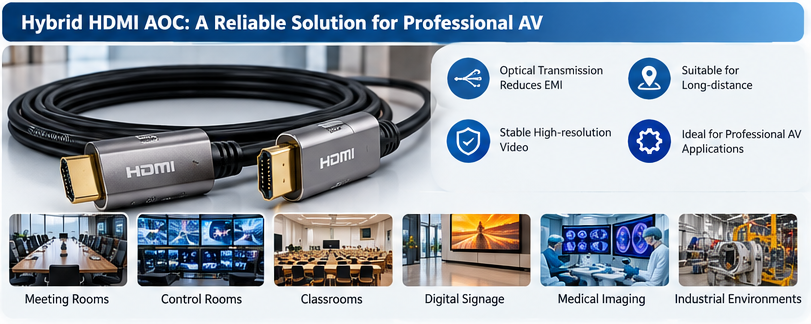
Why Do I Consider Hybrid HDMI AOC a Practical Solution?
At STAR FIRE TECH, we have provided connectivity solutions since 2006.
Our products include HDMI, DisplayPort, USB, USB-C, Ethernet cables, and Hybrid Active Optical Cables.
For customers who need long-distance high-resolution video transmission, I often consider Hybrid HDMI AOC solutions.
Our Hybrid HDMI AOC products use selected high-quality components, including German-sourced chips, American-sourced laser components, Japanese-sourced electronic components, and Kevlar reinforcement.
Selected models also use zinc alloy connector housings and EMI shielding designs.
These features support our approach to product construction and reliability.
However, I believe every cable should be evaluated according to its actual application and verified performance.
Which Applications Can Benefit From Hybrid HDMI AOC?
Application
Customer Requirement
Potential Benefit
Meeting rooms
Long-distance video connections
Reduced electrical loss along the optical path
Control rooms
Reliable display transmission
Lower EMI susceptibility in optical data transmission
Classrooms
Projector and display connectivity
Flexible cable length options
Digital signage
Long cable routing
Support for high-resolution transmission
Medical imaging displays
Stable video connections
Suitable high-bandwidth connectivity
Industrial environments
Video near electrical equipment
Reduced EMI exposure along optical paths
How Does STAR FIRE TECH Support Professional HDMI Projects?
We support OEM and ODM customization for different customer requirements.
Our customization options include cable length, connector design, jacket materials, labeling, and packaging.
For selected Hybrid HDMI AOC products, we support a minimum order quantity of one piece and delivery times of approximately three to seven days, depending on configuration and availability.
Our company maintains ISO and BSCI certifications and participates in HDMI, DisplayPort, and USB-IF industry programs.
Our HDMI 2.0 and HDMI 2.1 product portfolios include certified cable models.
I recommend checking the certification status of the specific cable model and length before making a purchasing decision.
For distributors, AV integrators, and equipment brands, I believe the right cable solution should match the required bandwidth, installation distance, electrical environment, and long-term reliability needs.
If you are evaluating HDMI EMI shielding or long-distance HDMI AOC solutions, we can discuss your application requirements and suitable products for testing.
Learn more: https://www.starfirecableshubs.com
Conclusion
I believe reliable HDMI performance requires proper shielding, signal integrity, installation planning, and product testing. Understanding EMI helps us reduce failures and choose better connectivity solutions.


