Table Of Content
Table Of Content
An industrial camera captures clear images during testing but loses frames after installation. An unsuitable Ethernet cable may cause communication problems and costly production delays.
To choose the right M12 Ethernet cable for industrial cameras, check the connector coding, Ethernet speed, cable category, shielding, length, and environmental requirements. A suitable cable should match the camera interface, support the required image data rate, and withstand the machine’s operating conditions.
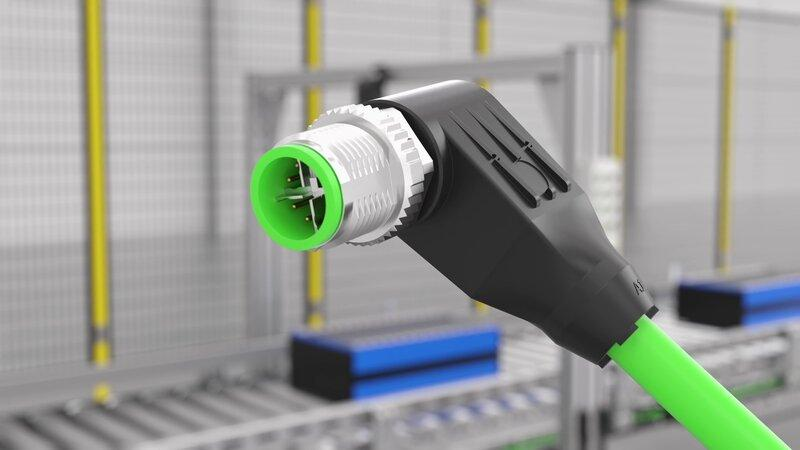
Industrial cameras are becoming an important part of modern factory automation.
They help manufacturers inspect products, measure dimensions, detect defects, and guide robotic equipment.
Many inspection systems now use several cameras at the same time.
These cameras send image data to industrial computers, Ethernet switches, or other processing equipment.
However, a high-quality camera cannot deliver reliable results if its network connection is unstable.
I believe that cable selection is often overlooked during machine vision system design.
Buyers may spend time comparing camera resolution, frame rate, and software features. Yet they may choose the Ethernet cable based mainly on price or connector appearance.
This approach can create problems after installation.
A cable that works well on a laboratory desk may perform differently near industrial motors, moving robots, and electrical equipment.
For machine builders and system integrators, these problems can lead to repeated troubleshooting, delayed projects, and unexpected maintenance costs.
At STAR FIRE TECH, we have provided connectivity solutions since 2006. Our industrial communication products include M8/M12 cable assemblies and industrial networking solutions.
From my perspective, the best cable is not always the one with the highest specification or the lowest price.
It is the cable that matches the camera, network, and working environment.
M12 D-Coded vs. X-Coded: Which Connector Should You Choose for Industrial Cameras?
A camera may have an M12 Ethernet port, but not every M12 connector is compatible. Choosing the wrong coding can prevent communication or limit network performance.
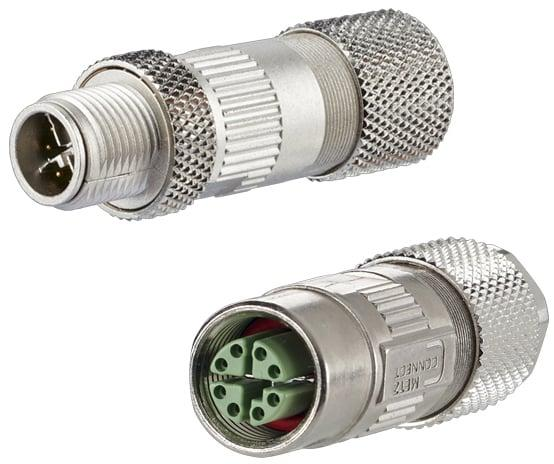
M12 D-coded connectors typically support 100 Mbps Ethernet using four contacts. M12 X-coded connectors use eight contacts and support Gigabit Ethernet and higher-speed applications when the complete link is designed correctly. Always match the coding to the camera’s specified interface.
Why Does M12 Connector Coding Matter?
M12 is a family of circular industrial connectors.
Different coding designs support different electrical applications.
For industrial Ethernet, D-coded and X-coded connectors are common choices.
The coding design helps prevent incompatible connector types from being connected.
However, I recommend checking more than the connector shape.
The pin assignment, Ethernet speed, cable construction, and equipment interface must also match.
A D-coded M12 connector normally uses four contacts arranged for two Ethernet data pairs.
It is commonly used for 100BASE-TX Fast Ethernet.
An X-coded M12 connector uses eight contacts arranged for four data pairs.
It is suitable for Gigabit Ethernet and certain higher-speed industrial Ethernet applications.
The actual supported speed depends on the cable, connector, and complete network channel.
What Are the Main Differences Between D-Coded and X-Coded M12 Cables?
Feature
M12 D-Coded
M12 X-Coded
Contact count
4 pins
8 pins
Ethernet data pairs
2 pairs
4 pairs
Common Ethernet speed
100 Mbps
1 Gbps and higher, depending on design
Typical application
Industrial Ethernet devices
Gigabit cameras and high-speed networks
Connector design
D-coded interface
X-coded interface
Main buying consideration
Equipment compatibility
Bandwidth and complete link performance
I believe this comparison is useful for buyers who are developing different types of industrial equipment.
For example, a low-data-rate industrial Ethernet device may use a D-coded interface.
A GigE Vision camera may require an X-coded interface if that is the connector specified by the camera manufacturer.
However, not every GigE camera uses an M12 connector.
Some industrial cameras use RJ45 connectors with additional locking features.
Buyers should always follow the actual camera interface specification.
How Much Bandwidth Does an Industrial Camera Need?
Camera bandwidth depends on several factors.
These include image resolution, frame rate, pixel format, and compression.
I recommend estimating the image data rate before choosing the network connection.
A simple calculation is:
Raw Data Rate = Image Width × Image Height × Bits per Pixel × Frames per Second
For example, consider a camera with these settings:
The calculation is:
1920 × 1080 × 8 × 30 = 497,664,000 bits per second.
The raw data rate is approximately 498 Mbps.
This figure does not include Ethernet and protocol overhead.
A 100 Mbps Ethernet connection would not provide enough bandwidth for this continuous raw image stream.
A Gigabit Ethernet connection may be suitable if the camera, host, and network are configured correctly.
I believe this simple calculation helps buyers understand why connector coding and network speed matter.
For multi-camera systems, engineers must also consider the combined traffic from all cameras.
A cable with the correct connector cannot solve a network bandwidth shortage.
Why Do M12 Ethernet Cables Cause Signal Loss or Packet Loss in Machine Vision Systems?
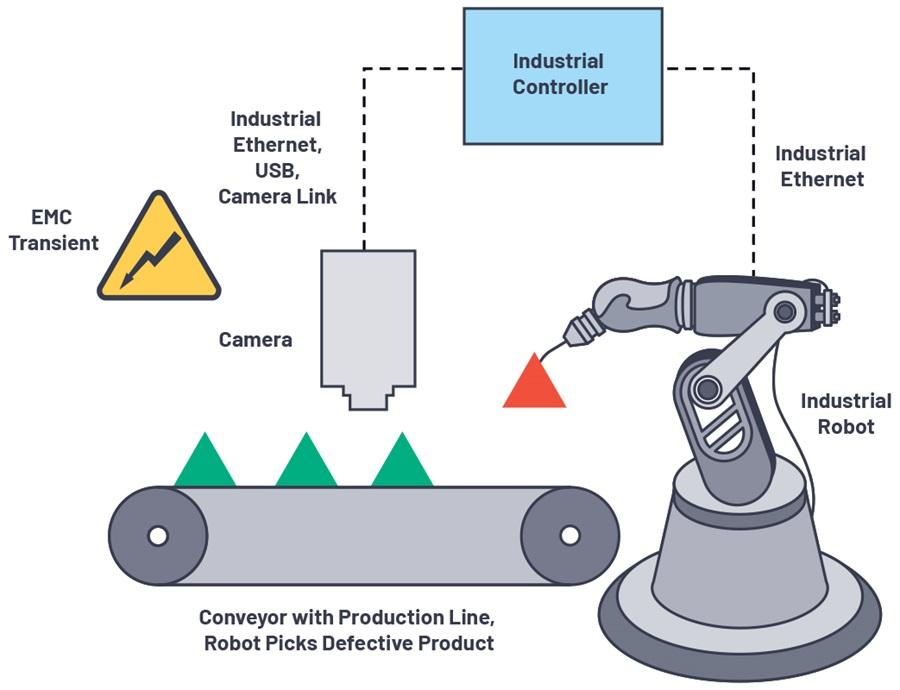
An industrial camera may work normally until nearby machines start operating. Communication errors, packet loss, and unexpected disconnections can interrupt image inspection.
Machine vision Ethernet problems can result from damaged cables, poor terminations, electromagnetic interference, excessive cable length, or insufficient network bandwidth. Suitable shielding, correct routing, compatible equipment, and proper testing help reduce these risks.
How Does Electromagnetic Interference Affect Machine Vision?
Factories contain many sources of electrical noise.
Motors, servo drives, variable-frequency drives, and switching power supplies can generate electromagnetic interference.
Industrial Ethernet cables may run close to this equipment.
A properly designed Ethernet connection uses differential signaling to help resist electrical noise.
However, poor shielding, damaged connectors, or incorrect cable installation can increase the risk of communication errors.
I believe that EMI protection should be considered during the design stage.
Imagine a machine vision camera installed beside an automated welding station.
The camera captures images and sends them to an industrial computer.
When the welding equipment operates, electrical noise may affect a poorly installed network connection.
The camera may experience link errors or lost data packets.
Depending on the system, these errors can lead to delayed images, missing frames, or inspection interruptions.
However, I would not assume that every dropped frame is caused by EMI.
A camera can also lose frames because of network congestion, incorrect software settings, or insufficient processing capacity.
Why Is Shielding Important for M12 Ethernet Cables?
Shielding helps reduce the effect of unwanted electromagnetic noise.
Industrial Ethernet cables may use foil shielding, braided shielding, or a combination of both.
However, the shielding design must work with the complete cable assembly.
The connector shell, shield termination, and equipment installation also affect performance.
I recommend checking whether the cable construction matches the required Ethernet standard.
For example, a Gigabit industrial camera needs a suitable four-pair Ethernet connection.
The cable category should support the required transmission performance.
I also recommend reviewing the cable route.
Even a well-shielded cable should not be installed carelessly beside high-power electrical wiring.
Where practical, separating communication cables from power cables can help reduce interference risks.
Can Cable Length Affect Image Transmission?
Cable length is another important factor.
Longer copper cables experience greater signal attenuation.
For many standard copper Ethernet applications, the familiar maximum channel length is 100 meters.
However, this limit does not apply to every camera, connector, cable, or Ethernet speed.
Some equipment has shorter supported cable lengths.
Higher-speed applications may also have different channel requirements.
I recommend checking the camera manufacturer’s maximum cable length and the specifications of the complete Ethernet link.
For example, a camera may be only three meters away from a control cabinet in a straight line.
However, the cable may need to follow a machine frame, pass through a cable carrier, and enter the cabinet from another direction.
The actual installed route may be much longer.
I believe buyers should measure the planned cable route rather than estimate the distance between devices.
What Are the Common Causes of Industrial Camera Network Problems?
Problem
Possible cause
Recommended action
Camera disconnects
Loose or damaged connector
Inspect and replace the connection if needed
Image packets are lost
Network congestion or link errors
Check bandwidth and error counters
Problems occur near motors
Possible EMI
Review shielding and cable routing
Camera fails to connect
Wrong coding or pin assignment
Confirm camera interface
Errors occur during robot movement
Cable fatigue
Select a suitable continuous-flex cable
Communication fails over long distances
Unsupported cable length
Verify complete link specifications
Problems appear after cleaning
Water entering a connection
Check sealing and IP rating
How Can Engineers Identify the Real Cause?
I recommend testing the system in a clear order.
First, confirm the camera’s network settings and required data rate.
Second, inspect the cable and connectors for visible damage.
Third, replace the cable temporarily with a known-good compatible assembly.
Fourth, check the Ethernet link speed and network error counters.
Fifth, test the camera while nearby machinery operates.
Sixth, review the cable route and mechanical movement.
This process can help identify whether the problem comes from the cable, camera, network equipment, or system configuration.
For buyers, I believe a supplier that understands these technical requirements can provide more value than one that only offers a low unit price.
How Do You Choose the Best M12 Ethernet Cable for Harsh Industrial Environments?
A standard Ethernet cable may work during initial testing but fail after months of vibration, bending, or moisture exposure. Industrial applications require suitable cable construction.
For harsh environments, choose an M12 Ethernet cable with the correct connector coding, suitable IP rating, cable jacket, shielding, and bending performance. Confirm the operating temperature, installation method, and mechanical requirements before ordering.
Should You Choose PUR or TPE Cable Jackets?
Industrial camera cables may be installed in very different environments.
Some cables remain fixed inside a machine.
Others move continuously with robotic equipment.
The jacket material and internal cable construction must match these conditions.
PUR and TPE are common materials for industrial cable jackets.
Depending on the formulation, PUR can provide good abrasion resistance and resistance to certain oils.
TPE materials can offer flexibility and other properties suited to demanding environments.
However, I do not believe buyers should choose a cable based only on the jacket material name.
The complete construction matters.
A cable intended for fixed installation may not be suitable for continuous bending.
For moving equipment, buyers should confirm the minimum bending radius and the manufacturer’s tested flex-life performance.
Which Cable Features Matter for Different Machine Vision Applications?
Machine vision application
Important cable features
Fixed inspection camera
Suitable Ethernet performance and connector retention
Robotic camera
Continuous-flex construction and strain relief
Food processing inspection
Suitable sealing and cleaning-agent resistance
Outdoor industrial camera
Temperature, moisture, and UV suitability
High-speed GigE camera
Correct coding, data rate, and cable category
Factory with strong EMI
Suitable shielding and cable routing
Compact equipment
Straight or angled connector options
I recommend reviewing the working environment before choosing a cable assembly.
For example, a fixed camera mounted above a conveyor may need a different cable from a camera attached to a moving robotic arm.
Both cameras may use the same Ethernet speed.
However, their mechanical requirements can be very different.
Is IP67 Protection Necessary for Industrial Cameras?
Many industrial environments contain dust, moisture, or cleaning fluids.
M12 connectors are often selected because they can provide secure connections and environmental protection.
An IP67-rated connection is designed to resist dust and temporary immersion under defined test conditions.
However, the rating depends on the complete assembly and correct installation.
A damaged seal or an improperly mated connector may reduce protection.
I recommend checking the specified IP rating of the finished cable assembly.
Buyers should also consider whether the installation involves high-pressure washdown, chemical cleaning, or continuous outdoor exposure.
IP67 alone does not guarantee suitability for every harsh environment.
What Should OEM Buyers Check Before Ordering M12 Cable Assemblies?
For OEM and ODM projects, I recommend preparing a clear technical specification.
This helps reduce errors during sampling and production.
Specification
What buyers should confirm
Connector coding
D-coded, X-coded, or another required interface
Connector gender
Male or female
Connector orientation
Straight or angled
Pin assignment
Exact wiring diagram
Ethernet speed
100 Mbps, 1 Gbps, or another required speed
Cable category
Suitable transmission performance
Cable length
Actual installed route
Shielding
Required noise protection
Jacket material
PUR, TPE, or another suitable option
Bending requirements
Fixed, flexible, or continuous-flex use
IP rating
Required environmental protection
Operating temperature
Expected minimum and maximum temperatures
I believe detailed drawings are especially useful for custom cable projects.
A drawing can confirm connector orientation, dimensions, pin assignments, and cable construction.
It also helps both the buyer and supplier avoid misunderstandings.
Why Is Reliable Industrial Connectivity Becoming More Important?
From my perspective, machine vision systems are becoming more demanding.
Manufacturers are using higher-resolution cameras, faster production lines, and more automated inspection equipment.
Some factories use several cameras to inspect one product from different angles.
These cameras must transfer large amounts of image data reliably.
At the same time, manufacturers want to reduce unexpected downtime and maintenance costs.
This means that cable reliability is becoming more important.
I believe buyers should evaluate industrial camera cables based on three main factors.
The first is electrical performance.
The cable must support the required Ethernet speed and camera interface.
The second is mechanical performance.
The cable must withstand the actual movement and environmental conditions.
The third is long-term maintenance.
The cable should be easy to identify, replace, and maintain.
A reliable cable does not guarantee that an entire machine vision system will never fail.
However, the correct cable can help remove one common source of communication problems.
How Can STAR FIRE TECH Support Custom M12 Cable Projects?
At STAR FIRE TECH, we have provided connectivity solutions since 2006.
Our business covers professional AV, optical fiber communication, structured cabling, and industrial communication.
For industrial automation applications, we offer M8/M12 cable assemblies and industrial networking solutions.
Our M12 cable options include different connector configurations, cable lengths, and jacket materials.
We support OEM/ODM customization based on customer drawings and technical requirements.
For industrial camera projects, I recommend sharing the camera model, connector coding, Ethernet speed, cable length, installation environment, and expected cable movement.
Our team can review these requirements and discuss suitable cable assembly options.
We can also discuss sample evaluation and production planning based on the selected specifications.
I believe that good cooperation starts with understanding the customer’s application.
For machine vision equipment manufacturers, automation system integrators, and industrial distributors, the goal should be a cable solution that performs reliably in the intended environment.
If you are looking for custom M12 Ethernet cable assemblies for industrial cameras and machine vision, I welcome the opportunity to discuss your project.
Learn more: https://www.starfirecableshubs.com
Conclusion
I believe choosing the right M12 Ethernet cable starts with camera compatibility, bandwidth, shielding, and environmental requirements. Proper selection helps reduce connection problems and supports reliable machine vision.