Table Of Content
Table Of Content
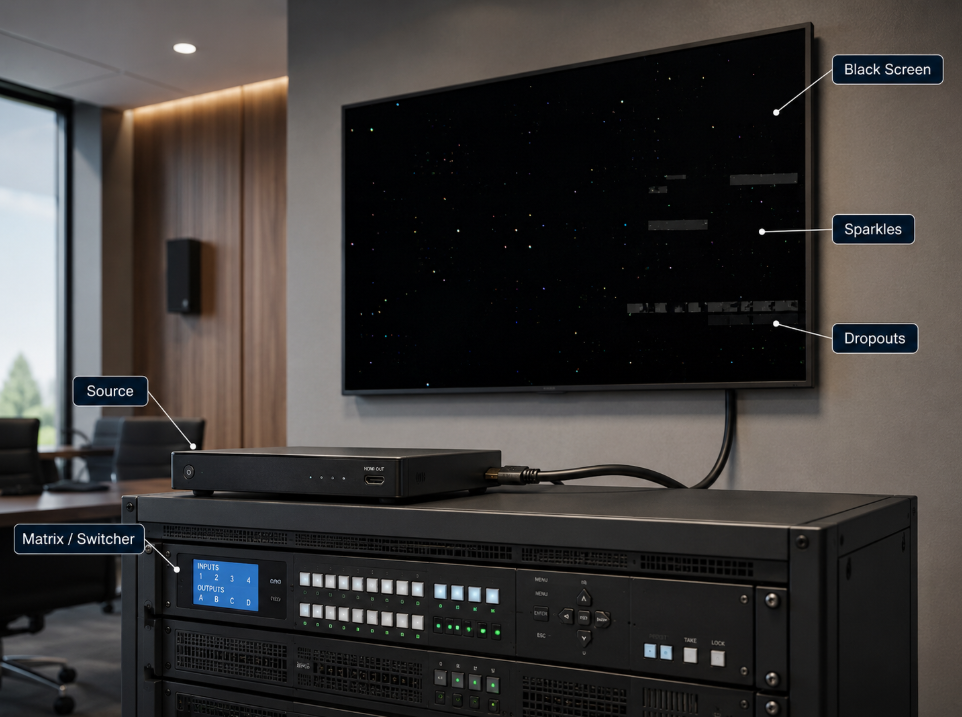
When an HDMI signal fails in a professional AV system, the cable is often blamed first. Sometimes that is correct. Often it is not.
A black screen, sparkles, dropouts, or a source that works at 1080p but fails at 4K60 can originate from several layers: signal margin, EDID, HDCP, bandwidth, connectors, active optical cable installation, EMI, or an upstream matrix, extender, scaler, or display.
After years of working with Pro AV connectivity, one principle stands out: troubleshoot HDMI as a chain, not as isolated products. The goal is to isolate the layer that fails, not to guess which component is bad.
Start With the Symptom, Not the Suspect
The first step is to define the failure precisely. 'No signal' is not a diagnosis. Ask what the system is actually doing.
A black screen may indicate loss of link, HDCP failure, or no valid source output. Sparkles often point to marginal signal integrity. Repeated dropouts can mean the link is operating too close to its error threshold. A picture that returns after replugging often suggests EDID, Hot Plug Detect, or HDCP behavior.
This symptom-first approach immediately narrows the test path and prevents unnecessary component replacement.
Fast Symptom Map
| Symptom | Likely Areas to Check |
|---|---|
| Black screen / no sync | Source output, link integrity, EDID, HDCP, wrong input |
| Sparkles / pixel noise | Marginal high-speed signal integrity, connector or cable loss |
| Random dropouts | Insufficient margin, long cable, EMI, active-device instability |
| Works at 1080p, fails at 4K60 | Bandwidth / signal-margin limitation |
| Works after replugging | EDID, HPD, HDCP or active-cable initialization |
| Works direct, fails through matrix/extender | Intermediate device, bandwidth, EDID/HDCP management |
Reduce the System to a Known-Good Point-to-Point Link
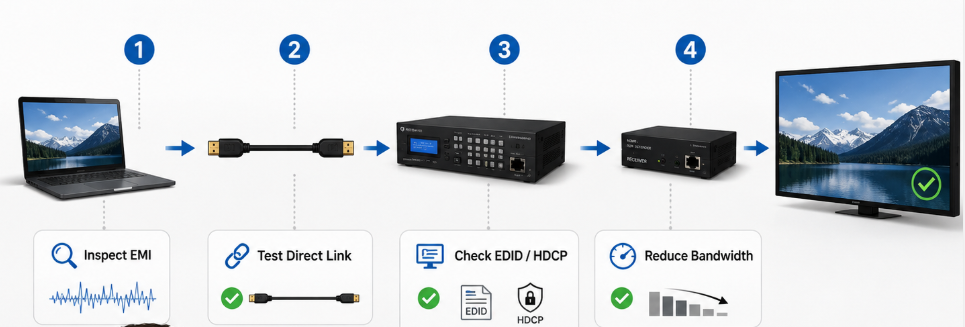
Before troubleshooting a full Pro AV chain, remove as many variables as possible. Connect the source directly to the display using a short, known-good certified HDMI cable and test the exact target format.
If the direct link works, add the matrix, extender, wall plate, adapter, or processor back one stage at a time. The stage that reintroduces the failure becomes the next investigation point.
Every added connection introduces loss, impedance discontinuities, handshake complexity, and another possible failure point.
Confirm the Real Video Format and Bandwidth
Engineers should never troubleshoot from the label '4K' alone. 4K30, 4K60 4:2:0 8-bit, 4K60 4:4:4 8-bit, and 4K60 HDR 10-bit do not place the same demand on the HDMI link.
A system may look stable at 1080p or a reduced 4K format while failing at a higher-bandwidth mode because the channel no longer has enough margin. Temporarily lower refresh rate, color depth, or chroma format. If stability returns immediately, that is strong evidence of a bandwidth or signal-integrity limitation rather than a simple software problem.
Also verify that every device in the chain supports the requested operating mode. Current 48Gbps Ultra High Speed HDMI systems and newer HDMI 2.2 Ultra96 configurations are not interchangeable at their highest bandwidths.
Separate EDID Problems From HDCP Problems
EDID and HDCP are frequently grouped together as 'handshake problems,' but they are different processes and should be tested separately.
EDID tells the source what the downstream system can accept. If it is inconsistent, corrupted, or changes during switching, the source may output an unexpected format or fail to establish video.
HDCP is content protection. A valid video timing can still produce a black screen if authentication fails. In matrixed systems, use available diagnostics to inspect resolution, EDID, HDCP authorization, and sync status instead of troubleshooting blindly.
Evaluate the Physical HDMI Channel
Once format and handshake are understood, inspect the physical link. High-speed HDMI performance depends on much more than continuity.
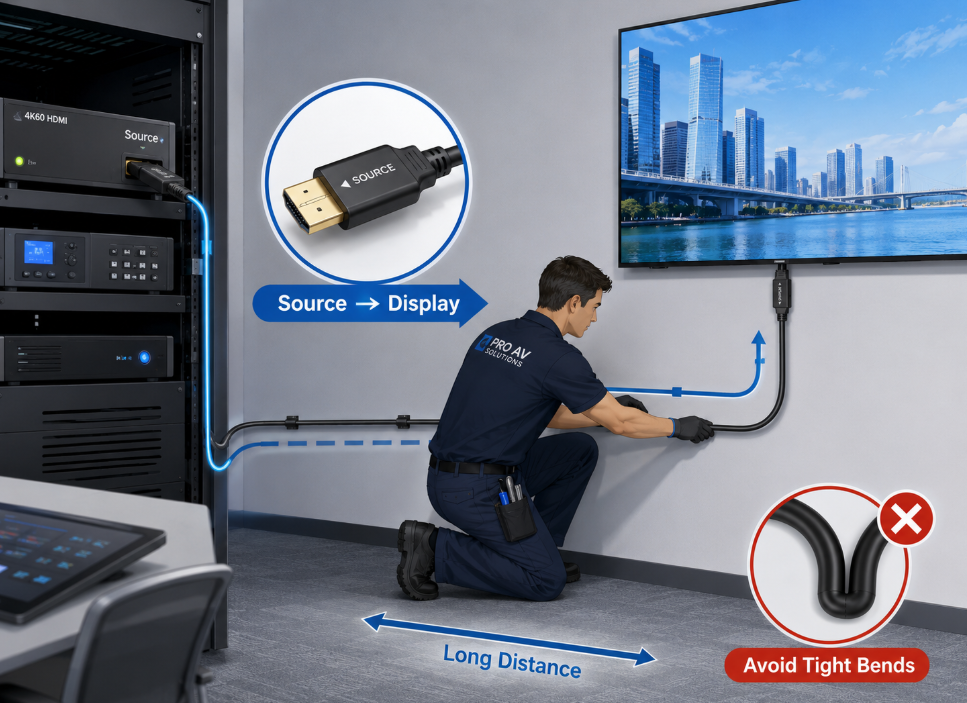
Look for excessive length, adapters, tight bends, damaged connectors, wall plates, couplers, or runs beside high-power cabling. Every transition can reduce margin, especially with passive copper as distance and data rate rise.
For longer runs, active copper or Hybrid HDMI AOC may be more appropriate. Fiber-based AOC improves EMI immunity and long-distance capability, but it introduces installation requirements of its own.
Check AOC Direction, Power, and Bend Conditions
Active optical HDMI cables are not ordinary passive cables. Many are directional and are marked Source and Display, or Source and TV. If installed backward, the link may not work at all.
Verify the power conditions expected by the active electronics. Also check bend radius, conduit pressure, pulling force, and stress behind the display; an AOC can be damaged internally even when its jacket looks normal.
A long-distance HDMI link should therefore be tested after final routing, not only on a workbench before installation.
Treat EMI and Grounding as System Variables
Interference problems are often intermittent, which makes them difficult to diagnose. A cable may work during commissioning and fail when LED walls, motors, elevators, RF equipment, high-current power supplies, or other systems become active.
Separate HDMI from high-power runs where practical, inspect grounding, and consider fiber-based transmission in electrically hostile environments.
In medical imaging, control rooms, broadcast facilities, industrial visualization, and large digital signage projects, EMI resilience is not a cosmetic specification. It is part of system reliability.
Use a Repeatable Troubleshooting Sequence
A disciplined sequence saves time: verify source and display; establish a short point-to-point reference; confirm resolution, refresh rate, chroma, bit depth, HDR, and HDCP; inspect EDID/HDCP; reduce bandwidth to test margin; add intermediate devices one at a time; substitute a known-good cable; verify AOC direction; then investigate EMI, power, grounding, and firmware.
Document the exact format and full signal path. '4K works' is not enough; good records turn troubleshooting into engineering data.
The Deeper Lesson: Design for Margin, Not Just Compatibility
Reliable Pro AV systems are designed with enough margin to tolerate routing, connector aging, temperature, device variation, switching events, EMI, and future format changes.
Good troubleshooting begins during design: choose transmission architecture by distance and bandwidth, minimize transitions, use certified cables where applicable, standardize EDID behavior, and validate the full chain at the highest required mode. For long high-bandwidth runs, evaluate whether Hybrid AOC provides a better margin than stretching copper farther.
At STAR FIRE TECH, our work in Pro AV connectivity, Hybrid AOC, optical fiber communication, structured cabling, and industrial communication follows this system-level view: the goal is not merely a bench pass, but stable operation in the customer's real environment.
CONCLUSION
HDMI troubleshooting should be systematic. A blank screen is only the visible symptom; the cause may be bandwidth, signal integrity, EDID, HDCP, cable architecture, installation, or system interaction.
The most useful question is not 'Which product is broken?' but 'At which layer does the link stop behaving predictably?' That mindset makes troubleshooting faster, repeatable, and more valuable to the next project.